

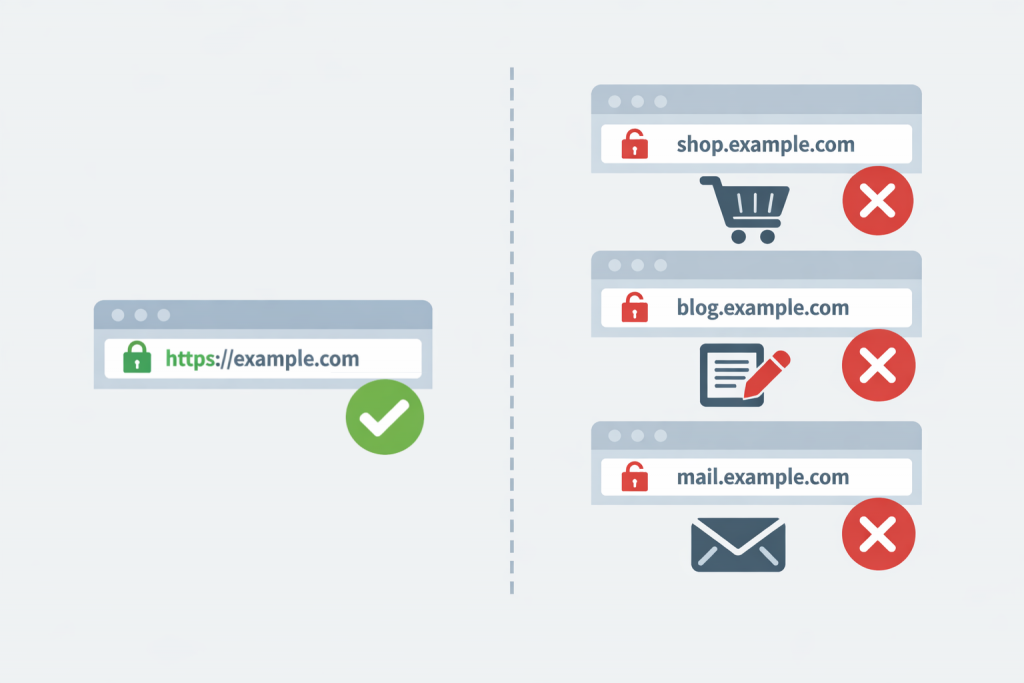
The situation is familiar to many website administrators. The main domain opens normally: the lock icon is visible in the browser, HTTPS works, there are no warnings. But as soon as you switch to a subdomain – for example blog.example.com or mail.example.com – the browser suddenly shows a message about an unsafe connection. For the user this looks like a website error. In reality, in most cases the server itself works normally. The issue is usually hidden in the way the certificate was issued or connected.
How a browser checks SSL
An SSL certificate is not only needed to encrypt traffic. When a page opens, the browser checks whether the site address matches the domain names listed inside the certificate. There is always a list of specific addresses there. If the browser sees a mismatch, it reacts quite strictly, even when the server is configured correctly and encryption itself works.
For the security system another thing matters: the domain a user connects to must literally match what is written in the certificate. Because of this, situations appear that seem strange at first glance. example.com opens without any problems, but the same site on a subdomain suddenly “breaks”.
The most common reason – a certificate for a single domain
In most cases the site has a regular certificate issued for one domain. It may be issued, for example, only for example.com or for www.example.com. As long as the user visits exactly this address, everything looks correct. The server provides the certificate, the browser compares the name – and shows a secure connection. But when someone opens blog.example.com, the browser sees a different domain name. It is not present in the certificate. For the browser this looks like a possible site substitution, which is why the warning appears. There is an important detail here: this is not an SSL failure and not a server malfunction. It is simply a security check working exactly the way it is supposed to.
A subdomain is a separate site for the browser
From the perspective of the site owner, a subdomain often looks like just part of one project. A blog, an API, a mail server, a control panel – all of it can exist within a single domain. But SSL works a little differently. For security verification each subdomain is treated as a separate address. shop.example.com, api.example.com or mail.example.com are viewed by the browser the same way as any other sites on the internet. If they are not listed in the certificate, the browser simply cannot confirm their authenticity. And then the familiar warning about an unsafe connection appears.
Wildcard certificates and typical confusion
When a site uses many subdomains, a wildcard certificate is usually installed. It contains a record like *.example.com. This means the certificate will work for all first-level subdomains. blog.example.com, shop.example.com, api.example.com – all of them are covered by one certificate.
But there is a detail people often forget. Such a certificate sometimes does not include the main domain itself. That means subdomains work normally, while example.com may produce a warning. In practice this happens more often than it seems. Especially when the certificate is issued automatically and nobody checks which domains are actually written inside it.
When the issue is not the certificate but the configuration
There is also a more complicated scenario. The certificate is correct, the subdomains are included, yet the browser still shows an error. In this case it makes sense to look at the server configuration. In real projects subdomains often run through different configuration blocks or even through separate services. For example an API, a mail server or a separate control panel. If the required certificate is not connected to that configuration block, the server simply returns another one. The browser again sees a mismatch in the domain name. From the user’s perspective it looks like a broken SSL setup, although in reality the problem is purely configurational.
An incomplete certificate chain
There is another situation that sometimes appears after the site has already been launched – an incorrect certification chain. SSL does not consist only of the main certificate. There are also intermediate certificates from the certification authority that confirm trust in it. If they are not connected completely, different browsers may behave differently. On one computer the site will open normally. On another a warning will appear. Sometimes this shows up specifically on subdomains because they are served by a different server configuration.
Why it matters for a website
Browser warnings about an unsafe connection work in a very simple way. A user sees a red message – and simply closes the tab. It becomes especially painful when subdomains are used for login pages, APIs or mail services. Some integrations may stop working entirely, and certain browsers simply block such connections. As a result, what seems like a minor SSL issue quickly begins to affect both user trust and the actual operation of the site.
Why these problems appear
Most often the reason is quite ordinary. At first a single site is launched on one domain. Later a blog appears, an API, a separate service or a control panel. Subdomains are added gradually, while the certificate remains the same.
In real projects this is a common story. It is simply better to think about such things in advance. Otherwise later you have to reissue certificates, change the server configuration and check everything again. Sometimes on a site that is already running.
Leave a Reply